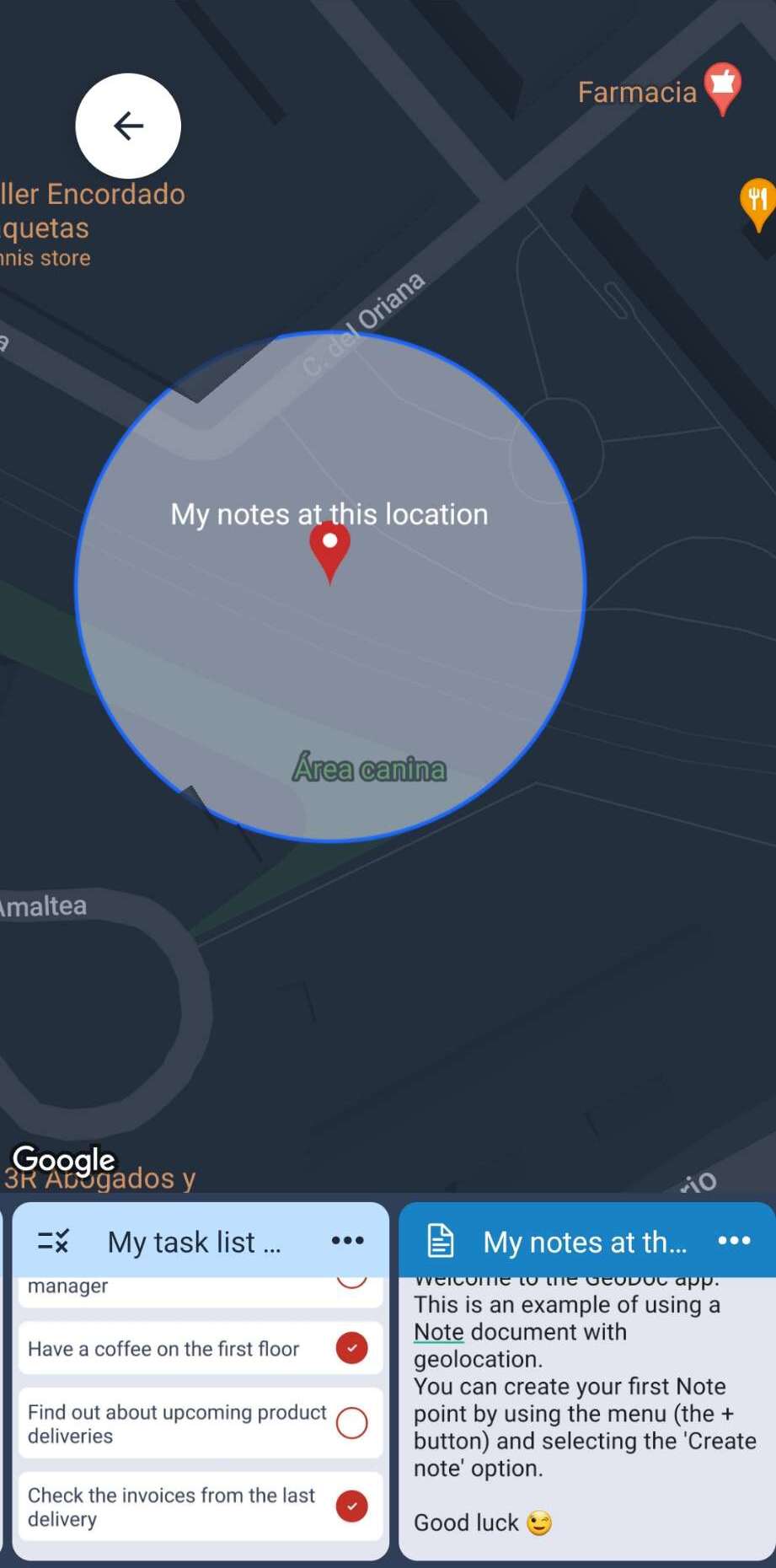
GeoDoc lets you place text documents, task lists, image galleries, and video galleries on a map as points — each with its own radius. Step into a point's radius and GeoDoc sends you a notification.
A location scheduler for your documents: set the place, and GeoDoc reminds you the moment you get there.

GeoDoc turns your documents into a map you can walk through. You place them on the map as points — and every point carries one of four kinds of document: a text document, a task list, an image gallery, or a video gallery.
Each point has its own radius, which you set yourself. The radius is what makes GeoDoc a scheduler: when you enter a point's radius, GeoDoc sends you a notification and surfaces that document. You don't set an alarm — the place itself is the trigger.
That is the core idea: your documents live where they belong, and your location does the remembering. The map is your organizer; your arrival is the reminder.
A normal reminder runs on the clock — it fires at a set time, whether or not you're ready. GeoDoc runs on your location: it waits until you're actually there.
To-do apps and alarms schedule by time; GeoDoc schedules by place. Every document is pinned to a point with its own radius, and the notification fires the moment you enter that radius — when it's genuinely useful. Here's how the two ways of scheduling compare:
| Capability | Time-based reminder app | GeoDoc |
|---|---|---|
| The trigger | A clock — fires at a set time | A place — fires when you enter a radius |
| When it's useful | May fire while you're still on the way | Always fires where you actually are |
| What it carries | A short text reminder or a single note | Full documents — text, task lists, image & video galleries |
| How you find things | A scrolling list, sorted by time | A map of points you can see at a glance |
| Setup | Set a separate alarm for every task | Pin once — it's there on every visit |
| Context | Only knows the time | Knows the real-world place |
You set a reminder for 3:30 PM to "check the site." At 3:30 you're still in traffic — the reminder fires anyway, and by the time you arrive you've forgotten what it was for.
You pin the task list to the site with a radius. Nothing fires while you're driving. The moment you step onto the site, GeoDoc notifies you — the right list, at the right place.
Write and place text documents on the map, tied to the exact spot where they're needed.
Create checklists that wait for you at a specific location and pop up when you arrive.
Pin collections of photos to a point on the map — a full gallery attached to one place.
Attach video collections to a location and open them the moment you're on site.
Every point carries its own radius. Enter it, and GeoDoc sends you a notification.
See, manage, and share all your points and their documents on a single interactive map.
GeoDoc is for anyone whose documents belong to a place, not a desk.
GeoDoc is free to use for individuals and small teams. Need onboarding or a custom workflow? Talk to us.
For individuals scheduling their documents by location.
For teams that need onboarding, roles, or a custom workflow.
GeoDoc was born from a simple frustration: most scheduling tools assume you'll be at a desk, watching the clock. But the people who actually get things done — the field technicians, site managers, delivery drivers, and planners — spend their days moving from place to place.
We build software that respects that reality. GeoDoc treats location as a trigger, not an afterthought, so the right document, task list, or gallery is always waiting for you at the exact place you need it.
Our mission is simple: let your documents live where they belong, and let your location do the remembering.
We're a small, focused team, and we'd love to hear how you work. If you want your files scheduled by location, we'd be glad to show you around.
Contact SalesGeoDoc is a location scheduler. You place text documents, task lists, image galleries, and video galleries on a map as points, each with its own radius, and GeoDoc notifies you when you enter that radius.
Every document point on the map has its own radius. When you enter that radius, GeoDoc sends you a notification and surfaces the document at the exact place it belongs. No manual alarms or timers — the location itself is the trigger.
Regular reminder apps run on the clock — they fire at a set time whether or not you're ready. GeoDoc runs on location: it fires only when you enter a point's radius, so the reminder always arrives where you actually are.
Yes — GeoDoc is free to download and use. Teams that need dedicated onboarding or custom workflows can request a demo to explore enterprise options.
 GeoDoc